Why I built the process before the automation
I have spent more than two decades engineering and operating enterprise systems where reliability, security, and accountability matter. That experience shapes my approach to AI automation. I need to understand what a system is doing, not simply accept that it reports success.
More recently, I have been experimenting with agent frameworks, Claude Code, and Codex. The pitch is compelling: hand over a requirement and get back a tested feature. I wanted that to work.
The problem turned out to be different from what I expected. It was not capability. It was authority, visibility, and verification. Who was allowed to change the workflow? What actually ran? What evidence proved the result?
The setup that surprised me
I had a clear vision of the software factory: the major components, agent responsibilities, gateways between them, and the contracts needed to keep everything working together.
Where I went wrong was trying to implement the entire system in one go.
I configured agents, skills, tools, MCP integrations, and orchestration together rather than building and validating each part before connecting the next.
It worked well enough to make progress, until something unexpected happened.
I ran out of tokens on my coding agent and switched to a different model family. When I questioned the new agent about the test results, something did not add up.
The workflow had been verifying changes with custom Python scripts instead of the security tooling I thought I had established. I had not realized the process had changed. Correcting it broke the pipeline, which had become dependent on those scripts.
I could see the output, but could not reliably trace how it had been produced or which controls had actually run.
The original harness might have supported what I needed with a better configuration. But continuing to troubleshoot it meant spending more time maintaining the development machinery than building the project.
I did not abandon the architecture. I changed how I approached building it.
Smaller pieces, clear owners
Instead of replacing one orchestration framework with another, I broke the workflow into smaller pieces that could be understood, tested, and connected incrementally.
Each piece uses a tool I already knew, with a specific responsibility.
ChatGPT handles exploration and planning. Linear holds the work. Claude Code implements, Codex reviews, and GitHub provides version control and CI evidence.
Each offers far more capability than this workflow uses. Limiting their responsibilities was intentional.
Accessibility also influenced the design. Some of my best ideas happen away from my workstation, and exploring them from a phone should not require connecting to the development environment.
ChatGPT stays separate from execution. I can explore an architecture, reject an approach, or rethink requirements without triggering changes to the codebase. When an idea holds up, it becomes a Linear ticket with scope, dependencies, and measurable acceptance criteria.
That ticket is the handoff into engineering, not automatic permission to begin implementation.
The coding agent works within an approved scope, a separate agent reviews the changes, and automated checks provide evidence. Final approval stays with me.
I also learned to distinguish instructions from actual security controls. A rule in an agent’s prompt is not a security boundary. Where possible, I rely on restricted credentials, repository protections, required checks, and human approval, while documenting where those protections have limits.
Two gates
I established two primary control points.
The readiness gate determines whether a task has enough information to begin. It needs an objective, scope, acceptance criteria, dependencies, and outstanding decisions identified. A ticket can exist without being ready.
The completion gate determines whether work actually meets the requirement. Compiling is not enough. Criteria must be satisfied, checks must pass, review findings need resolution, and approval must be given.
When something fails, it goes back for correction with the reason attached.
The point is not more paperwork. It is preventing assumptions from becoming unauthorized decisions and making completion something measurable.
Proving the gates work
A green checkmark proves less than it seems to.
When I extended the automated security checks, negative testing became part of the acceptance criteria. We opened disposable pull requests with deliberately unsafe inputs. One contained a synthetic secret. Another used a dependency with known vulnerabilities.
Both triggered the expected failures, including the aggregate CI gate. Neither was merged.
The tests also highlighted a limitation. A dependency scanner can complete successfully without examining anything if there is no applicable manifest or lockfile. I documented that rather than treating green as proof of security.
Independent review also caught problems. On another change, Codex identified a misconfigured ownership file and documentation that overstated what had been verified. Both were corrected and reviewed again before approval.
That reinforced the need for deterministic checks and independent verification rather than an implementation agent’s report that the work was finished.
Seeing the whole thing
Even with the process established, information was still scattered across Linear, GitHub, and the coding agents.
I wanted one place to see what was ready, what was waiting, what had been verified, and where I needed to make a decision.
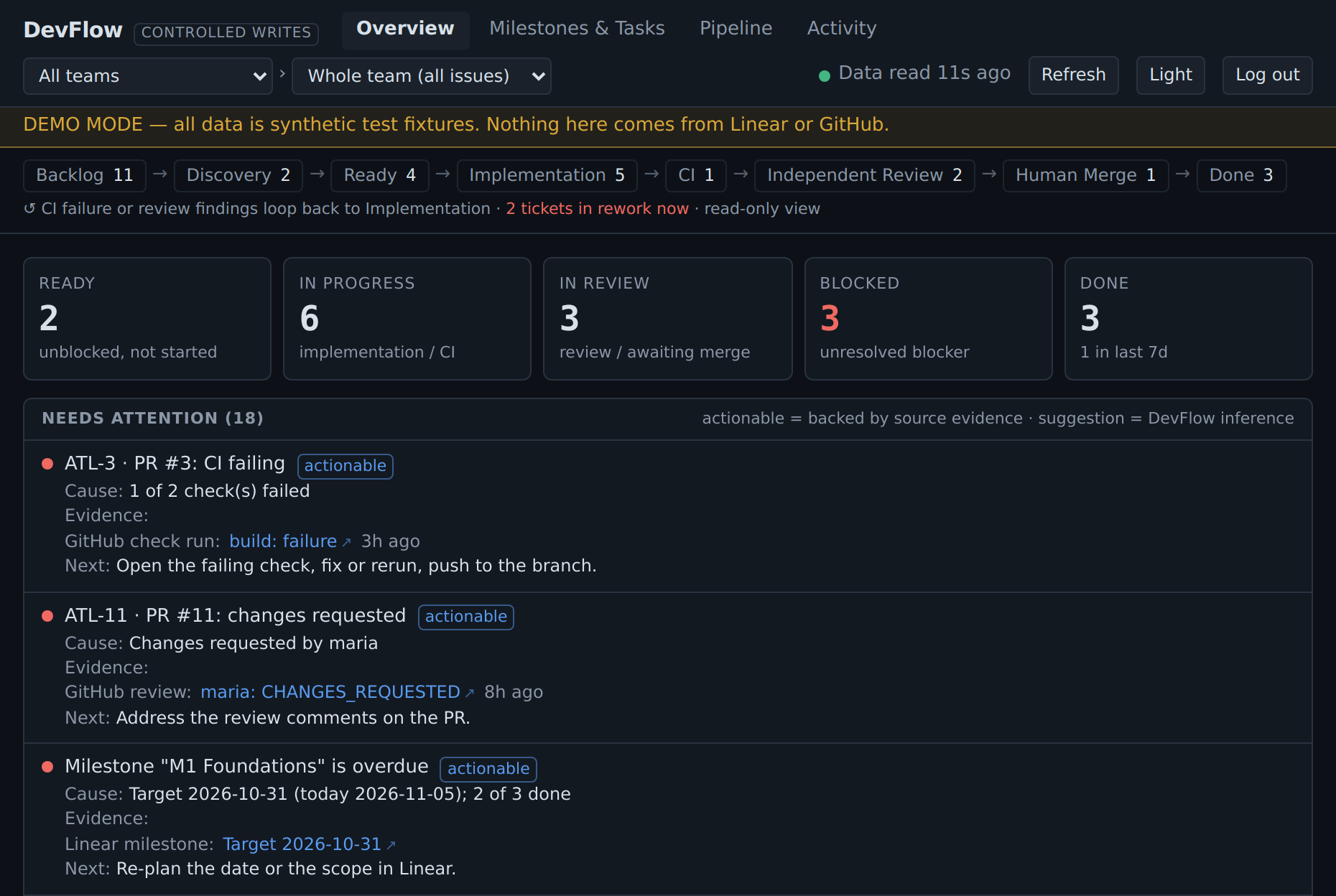
That led to DevFlow.
It is a small local application that brings those pieces together. It provides visibility and a few controlled operations without replacing the underlying systems. Linear and GitHub remain authoritative for their respective records.
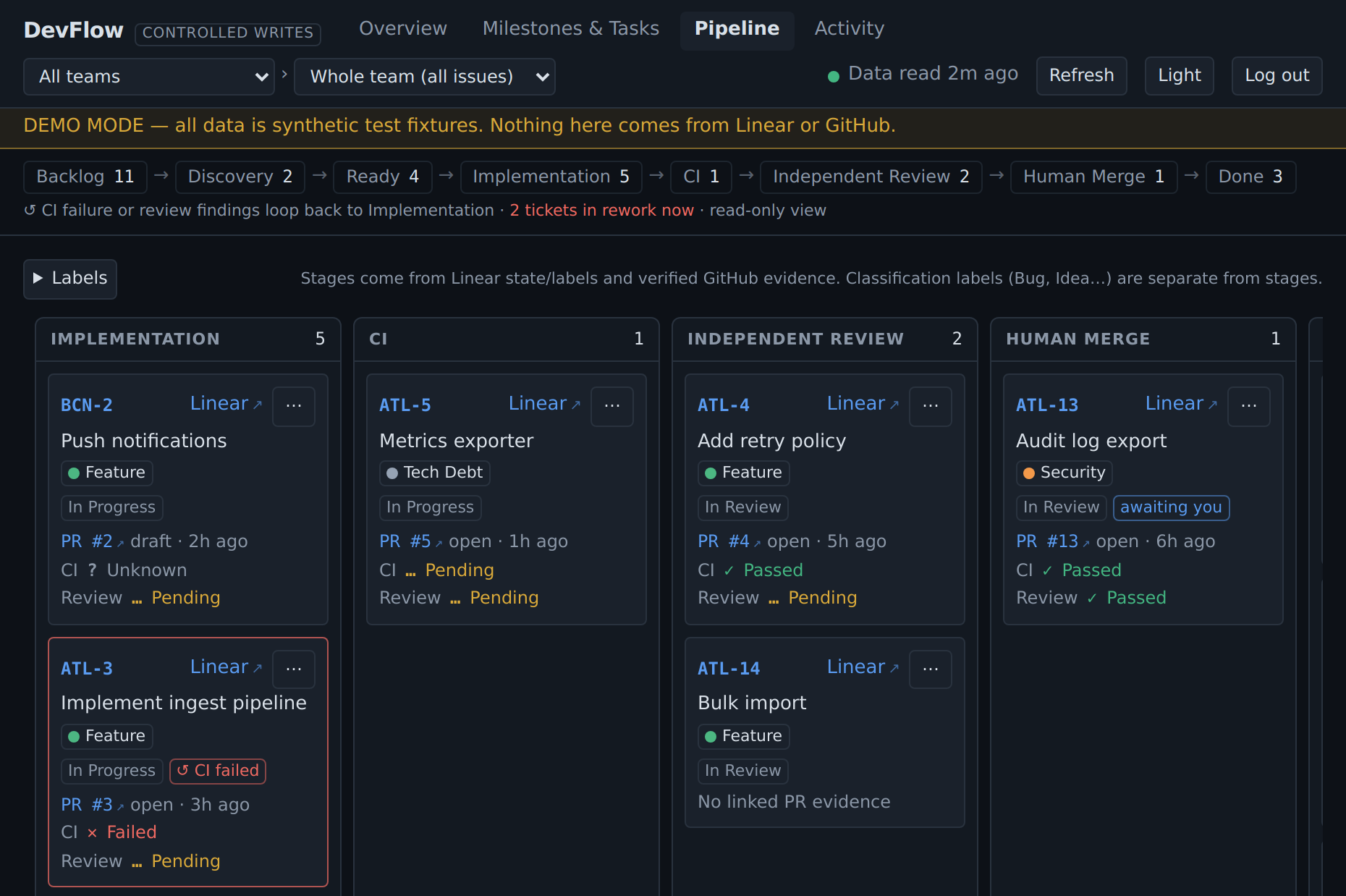
Building it introduced its own challenges with authentication, permissions, integrations, and accurate status reporting. AI accelerated implementation, but the application still needed engineering, testing, and security review.
Why I ran it by hand first
Much more of the coordination could be automated. An orchestration agent could watch Linear, pick up approved tickets, delegate implementation, request reviews, and loop through corrections.
I may eventually do exactly that.
But this time I wanted to prove the individual steps before connecting them into another autonomous system.
Running the workflow manually exposed permission problems, validation issues, and cases where reported workflow state did not match reality. It also demonstrated that manual coordination has limitations of its own. People miss steps as well.
Manual execution is not the destination. It is how I am validating the process before automating more of it.
The next step is to automate repetitive handoffs without changing who owns the decisions. The contracts and gates remain. The coordination gradually becomes less manual.
I still believe in agent orchestration. I now understand better what needs to sit underneath it.
Delegate execution freely. Delegate authority deliberately.